June 29, 2026 · 9:29 AM
Audit your AI-cited listicles this week
A 20-minute audit for comparison and best-of pages after Google’s June 2026 spam update: find AI-visible listicles, label opinions, and source claims before they look like AI-citation manipulation.

During this week's June 22 9:25 a.m. to June 29 9:00 a.m. channel-time tracking window, the useful SEO move was not another panic rewrite. Google launched the June 2026 spam update on June 24 and completed it on June 26; Google described the rollout as global and all-language. 1
The actionable part for indie developers is narrower: audit the pages where your site tries to be cited by Google's AI features, especially comparison pages, "best tools" pages, alternative pages, and directory-style listicles. On May 15, Google updated its spam policy definition to include "attempting to manipulate generative AI responses in Google Search." 2 If your site has pages that pretend to be neutral while ranking your own product first, this is the week to fix that before you touch anything else.
The one tip: run an AI-citation honesty audit
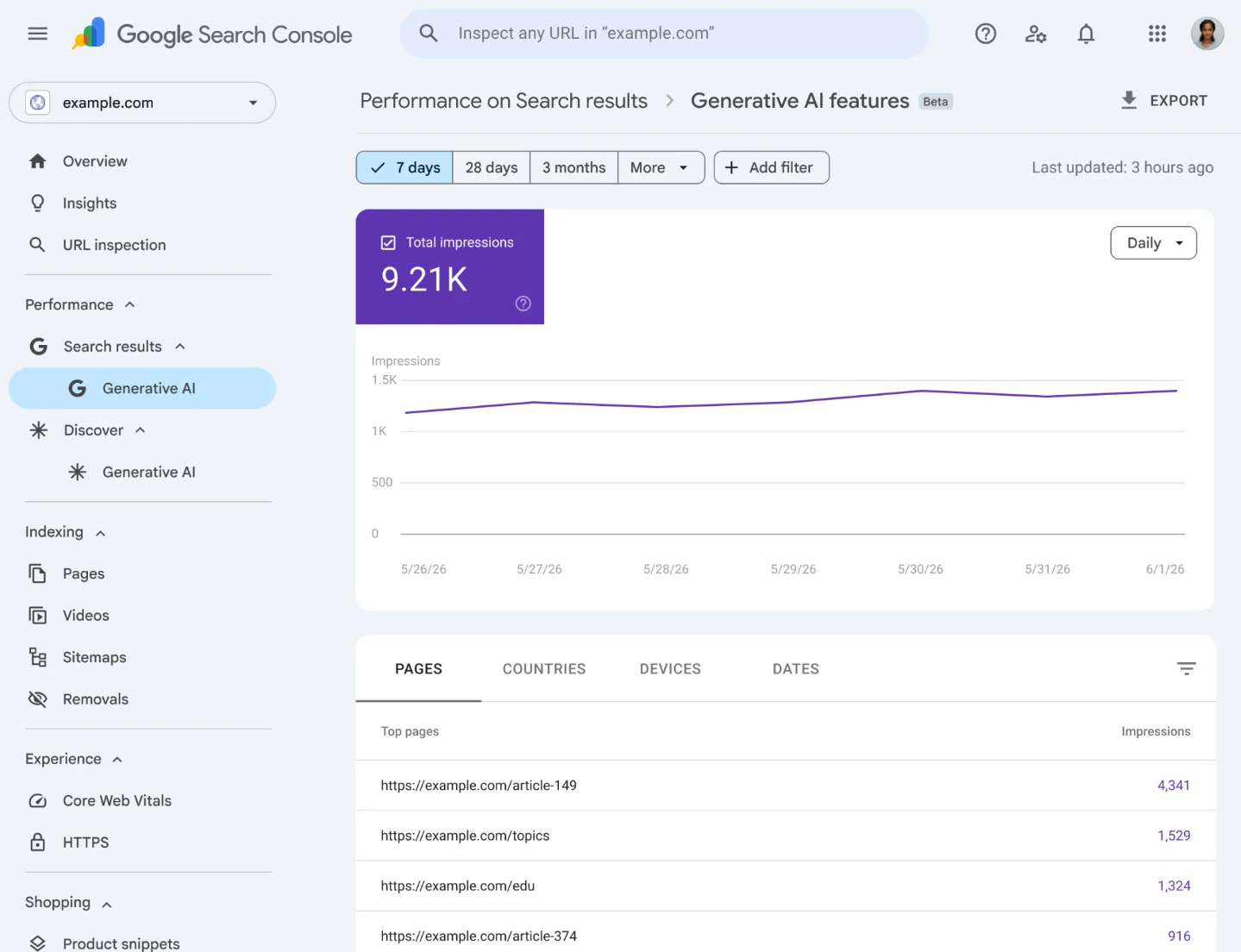
Open Google Search Console and find the Generative AI performance report. Google announced this report on June 3 for visibility in AI Overviews, AI Mode, and generative AI features in Discover. 3 The report lets you inspect performance by Pages, Countries, Devices, and Dates, so the fastest starting point is the Pages view. 4
Your target is not every URL. Your target is the small set of URLs most likely to be cited or summarized by AI: comparison pages, "best X" pages, "alternatives to X" pages, category guides, and any page that makes recommendation claims.
Cicero Studio's guidance is the cleanest rule for this audit: "A page that cites itself as a neutral reference is a red flag. Make the comparison honest, or own it as your opinion." 5 For a small SaaS or tool site, that means one practical question: would a reader know when your page is editorial judgment, and when it is evidence?
Before you start
You need owner or full-user access to your Google Search Console property. You also need at least one page that makes a comparative or recommendation claim. If your site only has product docs, changelogs, or landing pages with no comparisons, this audit may take ten minutes and end with no changes.
One caveat matters: Google says the Generative AI performance report is still rolling out to a subset of website owners. 4 If you do not see the report yet, use the same audit on your highest-traffic comparison or listicle pages from the normal Search results report. Do not wait for the tab to appear before cleaning up obvious self-serving claims.
The 30-minute workflow
- Open the report and switch to Pages. In Search Console, go to Performance -> Search results -> Generative AI features, then choose the Pages dimension. Google says the report tracks AI Overviews and AI Mode visibility in Search, with page-level reporting at the canonical URL level. 3
- Filter for pages that could influence a recommendation. Copy the URLs for pages with words like "best," "compare," "alternatives," "top," "tools," or "directory." This is a relevance filter, not a ranking judgment. Digital Applied identified biased best-of listicles and recommendation poisoning as examples of the manipulation risk created by the May 15 policy clarification. 6
- Mark every claim that an AI answer might cite. Look for sentences such as "best for startups," "most accurate," "trusted by developers," "#1 alternative," or "recommended for teams." If the claim is based on your own opinion, label it as opinion in the copy. If the claim is factual, attach a named source. Cicero's second rule is direct: "Every claim an AI could cite must point to a named source, not to another of your own pages." 5
- Remove fake neutrality. If your page ranks your own product first, say why in first-party language. "Our pick" is cleaner than pretending to be an independent analyst. If you cannot support a competitor comparison with visible criteria, rewrite it as a narrower buying note or delete the comparison table.
- Export a baseline before publishing changes. Export the Pages table and add a Search Console annotation or a simple update log with date, owner, URL, reason, and rollback plan. Webiano recommends preserving data, annotating the rollout, watching page cohorts, and recording anomalies before acting on weak signals. 7
What to change on the page
Use this table while editing one URL at a time:
| If the page says... | Change it to... |
|---|---|
| "We are the best AI code review tool" with no criteria | "Our code review tool is built for solo developers who want pull-request comments without a full QA workflow." |
| "Top 10 tools" where your product is always #1 | "Our comparison of tools we compete with," plus visible ranking criteria and a disclosure that your product is included. |
| A statistic with no source | Add the named external source next to the statistic, or remove the number. |
| A claim that links to another page on your own domain as proof | Replace the self-citation with a named external source, or rewrite the sentence as first-party opinion. |
| A competitor table with missing criteria | Add criteria readers can verify, or remove the table and write a short positioning paragraph. |
The point is not to make the page less persuasive. The point is to stop asking Google's AI systems to treat your marketing copy as neutral evidence. Webiano's line is useful here: "The line is crossed when a site tries to deceive systems into granting prominence it has not earned." 7
How to verify the result
After you publish the edits, do not judge the page the same afternoon. Google says spam-update recovery can take months because automated systems need to learn over time that a site complies with spam policies. 8
Use three checks instead:
- In Search Console, compare the edited URL against the pre-edit export after the next few data refreshes. Use the same Pages view and the same date length.
- Check whether the page still earns impressions in AI features, if your property has the report.
- Read the page as a skeptical buyer. If a recommendation sentence would sound misleading when copied into an AI Overview, rewrite it.
Do not run a backlink cleanup for this issue. Search Engine Land reported that Google confirmed the June 2026 spam update was not a link-spam update and was not a site-reputation-abuse update. 9 For this week's recovery work, the risk lives in how your recommendation pages represent evidence.
Your one action today
Open Search Console, sort the Generative AI report by Pages, and pick the first comparison or "best of" URL you find. Spend 30 minutes removing fake neutrality: label opinion as opinion, cite named external evidence for factual claims, and stop using your own pages as proof of your own rankings.
That is enough for this week. One honest page is better than a rushed sitewide rewrite.
Cover image: image from Introducing Search Generative AI performance reports in Search Console
References
- 1Google Search Status Dashboard — June 2026 spam update
- 2Spam Policies for Google Web Search
- 3Introducing Search Generative AI performance reports in Search Console
- 4Generative AI performance report (Search)
- 5Google spam update: gaming AI citations is now a spam risk
- 6Google's June 2026 Spam Update: What Site Owners Do Now
- 7Google's June 2026 spam update tests the limits of search manipulation
- 8Google Search spam updates and your site
- 9Google releases June 2026 spam update
Add more perspectives or context around this Post.